 dtoro
d4d99a7473
dtoro
d4d99a7473
Problem: the hexagonal refactor churns the backend tree for nine more
phases; the UI delivery stack (web/ SPA, cmd/desktop Wails wrapper,
compose/web image) must move to its own repo first so doc/layout
rewrites land once on a backend-only tree.

Change:
- New repo git.hubris.network/dtoro/oikos-web (v0.33.0): web/, desktop/
  (updateURL repointed to oikos-web releases), compose/, own CI (web +
  desktop jobs), own deploy script (CI-green gate, TOCTOU guard,
  version-tagged images, prune-to-3), own webhook receiver on :9798 +
  launchd unit, own compose project publishing the same 8091:80.
- Cutover executed on mac-mini in order: oikos stack's web service
  stopped+removed, oikos-web project brought up on 8091; outer Caddy
  untouched (targets the published port) — serving + Authentik flow +
  /wails 404 quirk verified post-cutover.
- Stripped from oikos: web/, cmd/desktop/, compose/web/, desktop CI
  workflow, ci.yml web job, Makefile ui/desktop/desktop-package/install
  targets, the compose web service, oikos-web from deploy.sh's fallback
  prune list; wails + go-keyring dropped from go.mod, vendor synced.
- README / CONTRIBUTING / AGENTS.md / .agents dev+operations docs now
  point at the new repo; mbse + mascot design docs carry a path note.

Risk: production SPA serving depends on the new pipeline now; rollback
is versioned-image re-up of the old web service from a pre-split
checkout (port 8091). Desktop builds installed before the split still
check dtoro/oikos releases — one manual reinstall, noted in the
oikos-web release notes.

Verification: go vet, make test (race), make generate-check, golangci
(no new findings; baseline down 400→365); post-cutover curls —
localhost:8091 200, /wails/runtime.js 404, outer Caddy 302 Authentik.
16 KiB
wmkit
Headless window manager for the web. Draggable, resizable, snappable windows with a taskbar model, keyboard accessibility and state persistence — for vanilla JS and every major framework.
Русская версия · Live demo · Mirror (Pages) · GitHub


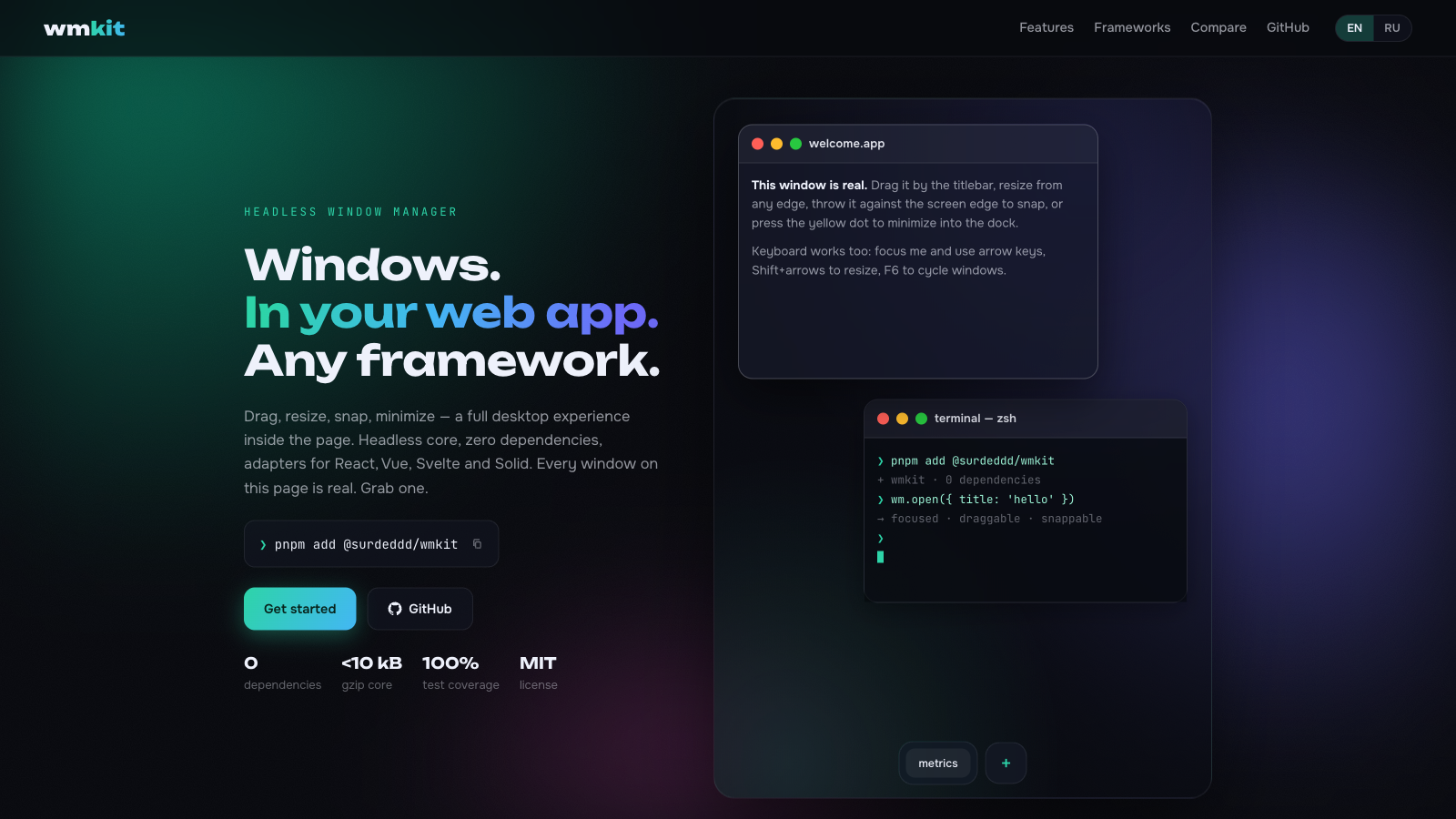
Every window above is real — open the demo and drag one.
- 🪟 Full window lifecycle — open, close, focus, minimize, maximize, restore, drag, 8-direction resize
- 🧠 Headless core — a serializable state machine plus a DOM controller; bring your own markup or use the glass theme
- ⚛️ Official adapters —
@surdeddd/wmkit/react,/vue,/svelte,/solid,/angular, all thin sugar over one core - ⊞ Snap zones — halves, quarters and drag-to-top maximize with a live preview
- 🧲 Magnetism — window edges align to neighbours and the viewport while dragging
- ↩️ Undo/redo — every mutation is one step; a whole drag collapses into a single history entry
- 🗂️ Named layouts & arrange — save/load desktop snapshots,
cascade/tilein one call - ⌨️ Accessible — keyboard move/resize, F6 window cycling, focus-trapped modals,
aria-liveannouncements - ⚡ Fast —
transform-only positioning, rAF-batched pointer input, structural sharing; 50 windows drag at 60fps - 💾 Persistence — one call to serialize the desktop, one call to restore it
- 🎨 Three themes — dark glass, light glass and Win98 retro, or bring your own CSS
- 🖼️ Popout (experimental) — send a window into Document Picture-in-Picture
- 📦 Zero dependencies, strict TypeScript, ESM + CJS, ~9.3 kB brotli core
Install
npm install @surdeddd/wmkit
# or
pnpm add @surdeddd/wmkit
Quick start (vanilla)
import { createWindowManager, attachDesktop } from '@surdeddd/wmkit'
import '@surdeddd/wmkit/themes/glass.css'

const wm = createWindowManager()
const desktop = attachDesktop(wm, document.querySelector('#desktop'))

const win = wm.open({ title: 'Hello', width: 420, height: 280 })

const el = document.createElement('section')
el.innerHTML = `
  <header data-wm-drag>
    <span data-wm-title>Hello</span>
    <span data-wm-controls>
      <button data-wm-minimize aria-label="Minimize"></button>
      <button data-wm-maximize aria-label="Maximize"></button>
      <button data-wm-close aria-label="Close"></button>
    </span>
  </header>
  <div data-wm-content>Anything you want.</div>
`
document.querySelector('#desktop').append(el)
desktop.attachWindow(win.id, el, { removeOnClose: true })
The desktop element becomes the coordinate space. Your markup stays yours — wmkit wires behavior onto data-wm-* attributes:
| Attribute | Meaning |
|---|---|
data-wm-drag |
drag handle (usually the titlebar); double-click toggles maximize |
data-wm-title |
window title node, linked via aria-labelledby |
data-wm-close / data-wm-minimize / data-wm-maximize |
control buttons, wired by delegation |
data-wm-content |
scrollable content area (styled by themes) |
removeOnClose detaches the controller and removes the element when the window closes. Touch devices get larger resize hit areas and snap thresholds automatically (pointer: coarse); tune via attachDesktop(wm, el, { hitAreas: { edge, corner } }).
The controller adds resize handles ([data-wm-resize]), a snap preview ([data-wm-snap-preview]) and a visually hidden live region for screen readers.
React
import { useWindowManager, useDesktop, useWmState, useWmWindowRef } from '@surdeddd/wmkit/react'
import '@surdeddd/wmkit/themes/glass.css'

function Desktop() {
  const wm = useWindowManager()
  const { ref, binder } = useDesktop(wm)
  const state = useWmState(wm)

  return (
    <div ref={ref} style={{ position: 'relative', height: '100vh' }}>
      <button onClick={() => wm.open({ title: 'New window' })}>open</button>
      {state.order.map((id) => {
        const win = state.windows[id]
        return win ? <Win key={id} binder={binder} win={win} /> : null
      })}
    </div>
  )
}

function Win({ binder, win }) {
  const ref = useWmWindowRef(binder, win.id)
  return (
    <section ref={ref}>
      <header data-wm-drag>
        <span data-wm-title>{win.title}</span>
        <span data-wm-controls>
          <button data-wm-minimize aria-label="Minimize" />
          <button data-wm-maximize aria-label="Maximize" />
          <button data-wm-close aria-label="Close" />
        </span>
      </header>
      <div data-wm-content>Your React tree lives here — no portals, no innerHTML.</div>
    </section>
  )
}
useWmState subscribes through useSyncExternalStore; unchanged windows keep referential identity, so memoized children skip re-renders.
Vue
<script setup>
import { ref } from 'vue'
import { useWindowManager, useDesktop, useWmWindowEl, useWmState } from '@surdeddd/wmkit/vue'
import '@surdeddd/wmkit/themes/glass.css'

const wm = useWindowManager()
const desktopEl = ref(null)
const binder = useDesktop(wm, desktopEl)
const state = useWmState(wm)

const noteEl = ref(null)
useWmWindowEl(binder, 'note', noteEl)
wm.open({ id: 'note', title: 'Note' })
</script>

<template>
  <div ref="desktopEl" style="position: relative; height: 100vh">
    <section ref="noteEl">
      <header data-wm-drag><span data-wm-title>{{ state.windows.note?.title }}</span></header>
      <div data-wm-content>composables all the way down</div>
    </section>
  </div>
</template>
Svelte
<script>
  import { createManager, createDesktop, wmWindowStore } from '@surdeddd/wmkit/svelte'
  import '@surdeddd/wmkit/themes/glass.css'

  const wm = createManager()
  const dk = createDesktop(wm)
  wm.open({ id: 'main', title: 'Hello' })
  const main = wmWindowStore(wm, 'main')
</script>

<div use:dk.desktop style="position: relative; height: 100vh">
  <section use:dk.window={{ id: 'main' }}>
    <header data-wm-drag><span data-wm-title>{$main?.title}</span></header>
    <div data-wm-content>stores and actions, no wrapper components</div>
  </section>
</div>
Solid
import { For } from 'solid-js'
import { useWindowManager, createDesktop, useWmState } from '@surdeddd/wmkit/solid'

function Desktop() {
  const wm = useWindowManager()
  const dk = createDesktop(wm)
  const state = useWmState(wm)
  wm.open({ title: 'Hello' })

  return (
    <div ref={dk.desktop} style={{ position: 'relative', height: '100vh' }}>
      <For each={state().order}>
        {(id) => (
          <section ref={dk.window(id)}>
            <header data-wm-drag>
              <span data-wm-title>{state().windows[id]?.title}</span>
            </header>
            <div data-wm-content>fine-grained, obviously</div>
          </section>
        )}
      </For>
    </div>
  )
}
Angular
import { AfterViewInit, Component, ElementRef, ViewChild } from '@angular/core'
import { useWindowManager, createDesktop, useWmState } from '@surdeddd/wmkit/angular'

@Component({
  selector: 'app-desktop',
  standalone: true,
  template: `
    <div #desktop style="position: relative; height: 100vh">
      <section #hello>
        <header data-wm-drag><span data-wm-title>Hello</span></header>
        <div data-wm-content>signals inside</div>
      </section>
    </div>
  `,
})
export class DesktopComponent implements AfterViewInit {
  wm = useWindowManager()
  dk = createDesktop(this.wm)
  state = useWmState(this.wm)
  @ViewChild('desktop') desktopRef!: ElementRef<HTMLElement>
  @ViewChild('hello') helloRef!: ElementRef<HTMLElement>

  ngAfterViewInit(): void {
    this.wm.open({ id: 'hello', title: 'Hello' })
    this.dk.desktop(this.desktopRef.nativeElement)
    this.dk.window('hello')(this.helloRef.nativeElement)
  }
}
useWmState returns a read-only Signal<ManagerState> and useWmWindow(wm, id) a computed per-window signal, so templates track updates fine-grained. Hooks called in an injection context clean up through DestroyRef automatically; outside one they simply skip auto-cleanup.
Snap zones in action
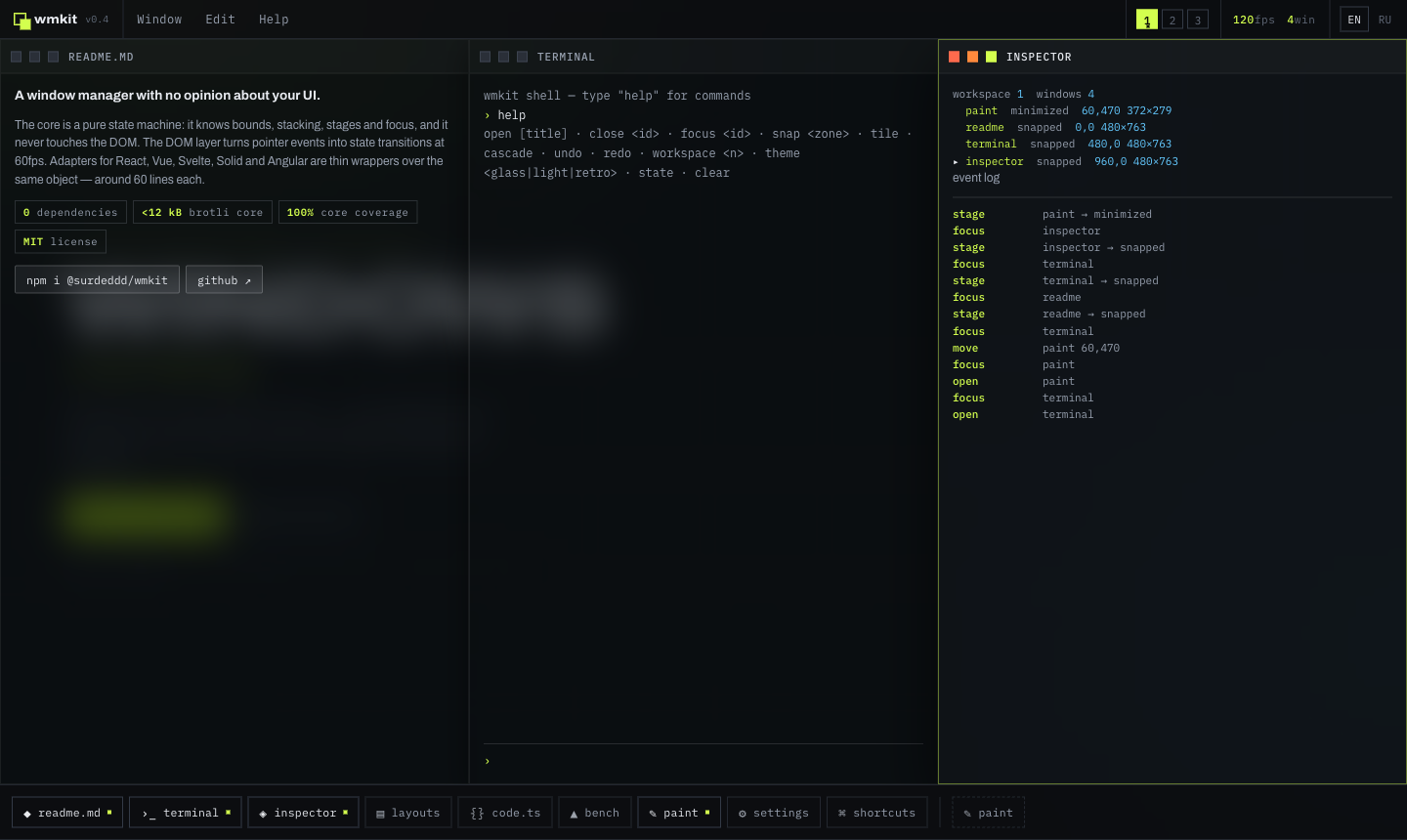
Throw a window against an edge or corner — a live preview shows the target zone, releasing tiles it. Halves, quarters, and drag-to-top maximize.
Core API
createWindowManager(options?)
Pure state machine — no DOM access, safe to create during SSR.
interface ManagerOptions {
  viewport?: { width: number; height: number }
  keepInViewport?: boolean      // clamp windows so the titlebar stays reachable (default true)
  minVisible?: number           // minimum visible strip in px (default 48)
  defaultSize?: { width: number; height: number }
  cascadeOffset?: number        // auto-position step for new windows (default 32)
  cascadeOrigin?: { x: number; y: number }
  idPrefix?: string
  historyLimit?: number         // undo/redo depth (default 50, 0 disables history)
}
Manager methods:
| Method | Notes |
|---|---|
open(init?) → WindowState |
throws on duplicate id; cascades position when x/y omitted |
close(id) / closeAll() |
focus moves to the next eligible window |
focus(id) / blur() / cycleFocus(dir?) |
focusing a minimized window restores it; modals block focus below them |
minimize(id) / maximize(id) / restore(id) / toggleMaximize(id) |
restore returns to the pre-minimize stage, including maximized/snapped |
snap(id, zone) |
'left' | 'right' | 'top' | 'bottom' | 'top-left' | … |
move(id, x, y) / moveBy(id, dx, dy) / resize(id, patch) |
resizing a snapped window unsnaps it |
restoreTo(id, bounds) |
used for drag-off-snap; stage → normal at explicit bounds |
update(id, patch) |
title, layer, min/max size, per-window flags, meta |
setViewport(size) |
re-derives maximized/snapped bounds, clamps the rest |
serialize() / hydrate(data) |
JSON-safe snapshot of the whole desktop |
undo() / redo() / canUndo() / canRedo() / clearHistory() |
every mutation is one step; a whole drag or resize collapses into a single entry |
saveLayout(name) / loadLayout(name) / deleteLayout(name) / layoutNames() |
named desktop snapshots; getLayout/setLayout for external storage |
arrange('cascade' | 'tile') |
cascade staggers restored sizes, tile fills the viewport in a grid |
minimizeAll() / restoreAll() |
bulk stage switches in one history step |
subscribe(fn) / on(event, fn) |
granular events: open, close, focus, move, resize, stage, update, order, modalblocked |
batch(fn) |
coalesce many operations into one change notification |
Windows carry layer: 'normal' | 'floating' | 'modal' — floating stays on top, modals trap focus and block interaction below (blocked attempts emit modalblocked and flash the modal).
attachDesktop(wm, element, options?)
DOM controller: pointer drag with capture (touch/pen included), 8-direction resize, snap detection with preview, keyboard handling, ARIA wiring, FLIP-to-taskbar animation.
interface DesktopOptions {
  snap?: boolean | { threshold?: number; cornerSize?: number; preview?: boolean; topEdge?: 'maximize' | 'top' | 'none' }
  keyboard?: boolean | { moveStep?: number; cycle?: boolean }
  announce?: boolean | Partial<AnnouncerMessages>   // localize screen-reader strings here
  autoViewport?: boolean                            // ResizeObserver → wm.setViewport (default true)
  magnetism?: boolean | { threshold?: number }      // edge-align to neighbours + viewport while dragging (default on, 8 px / 12 px coarse)
  hitAreas?: { edge?: number; corner?: number }     // resize handle thickness (auto-doubles on touch)
  minimizeTarget?: (win: WindowState) => Element | null  // FLIP ghost target on minimize
  onTitlebarContextMenu?: (win: WindowState, event: MouseEvent) => void  // right-click / long-press hook for your own menu
}
Keyboard defaults: arrows move the focused window (16 px), Alt for 1 px steps, Shift+arrows resize, F6 / Shift+F6 cycle windows, Escape cancels an in-flight drag or resize.
persist(wm, options?) — @surdeddd/wmkit/persist
import { persist } from '@surdeddd/wmkit/persist'

const store = persist(wm, { key: 'my-desktop' })  // auto-restores, then debounce-saves on change
store.clear()
Storage defaults to localStorage (probed safely — SSR and private-mode friendly) and accepts any getItem/setItem/removeItem implementation.
popout(wm, id, contentEl, options?) — @surdeddd/wmkit/popout (experimental)
Moves a window's content into a Document Picture-in-Picture always-on-top OS window, keeping the same JS context and state. Feature-detect with isPopoutSupported().
Theming
@surdeddd/wmkit/themes/glass.css styles the data-wm-* attributes and exposes CSS variables:
[data-wm-desktop] {
  --wm-radius: 14px;
  --wm-bg: rgba(22, 24, 34, 0.55);
  --wm-accent: #7c6cff;
  /* --wm-border, --wm-shadow, --wm-titlebar-bg, --wm-text, --wm-blur, --wm-transition … */
}
Two more ready-made themes ship alongside: themes/light.css (light glass) and themes/retro.css (pixel-perfect Win98 nostalgia). All three style the same data-wm-* attributes, so switching is a one-line import swap.
Skip the import entirely and the library stays headless: state attributes (data-wm-stage, data-wm-focused, data-wm-dragging, data-wm-flash, [hidden]) are yours to style.
SSR
The core never touches window/document — create managers and even hydrate() state on the server, then call attachDesktop after mount. persist no-ops without usable storage.
Comparison
| wmkit | WinBox | jsPanel4 | Dockview | Zag floating-panel | |
|---|---|---|---|---|---|
| Maintained | ✓ 2026 | ✗ since 2023 | ✗ since 2022 | ✓ | ✓ |
| Headless core | ✓ | ✗ | ✗ | ~ own UI | ✓ |
| Official adapters | React·Vue·Svelte·Solid·Angular | community | ✗ | React·Vue·Angular | via Ark UI |
| Multi-window (z-order, taskbar, modals) | ✓ | partial | partial | dock groups | ✗ single panel |
| Snap zones + preview | ✓ | ✗ | ✗ | — | ✗ |
| Keyboard + screen reader | ✓ | ✗ | ✗ | partial | partial |
| Persistence built in | ✓ | ✗ | ✗ | ✓ | ✗ |
| Document PiP popout | ✓ | ✗ | ✗ | window.open | ✗ |
| TypeScript | strict | @types | ✗ | ✓ | ✓ |
(checked July 2026: commit history, npm downloads, open feature requests)
Quality
- 172 unit tests, 100% line/branch/function/statement coverage on the core state machine and persistence
- 178+ Playwright scenarios on Chromium, WebKit and mobile emulation: drag, 8-way resize, snap, magnetism, undo after drag, keyboard, touch, persistence across reloads, 50-window stress, modal traps, axe accessibility scans, visual regression screenshots
- performance benchmarks run in CI on every push (
vitest bench): 1 000 windows open in ~150 ms, a move among 50 windows costs ~1.2 µs, a full 100-step undo/redo sweep ~52 µs publint+@arethetypeswrong/clivalidate the published package,size-limitguards bundle budgets
Development
pnpm install
pnpm dev          # landing + playground on Vite
pnpm test         # unit tests
pnpm test:e2e     # Playwright matrix
pnpm verify       # the full gate: lint, types, coverage, build, size, publint, e2e
License
MIT © Maksim Kravcov